
Vectorless RAG: Can We Build RAG Without a Vector Database?
What if finding the right information isn't always about finding similar text?
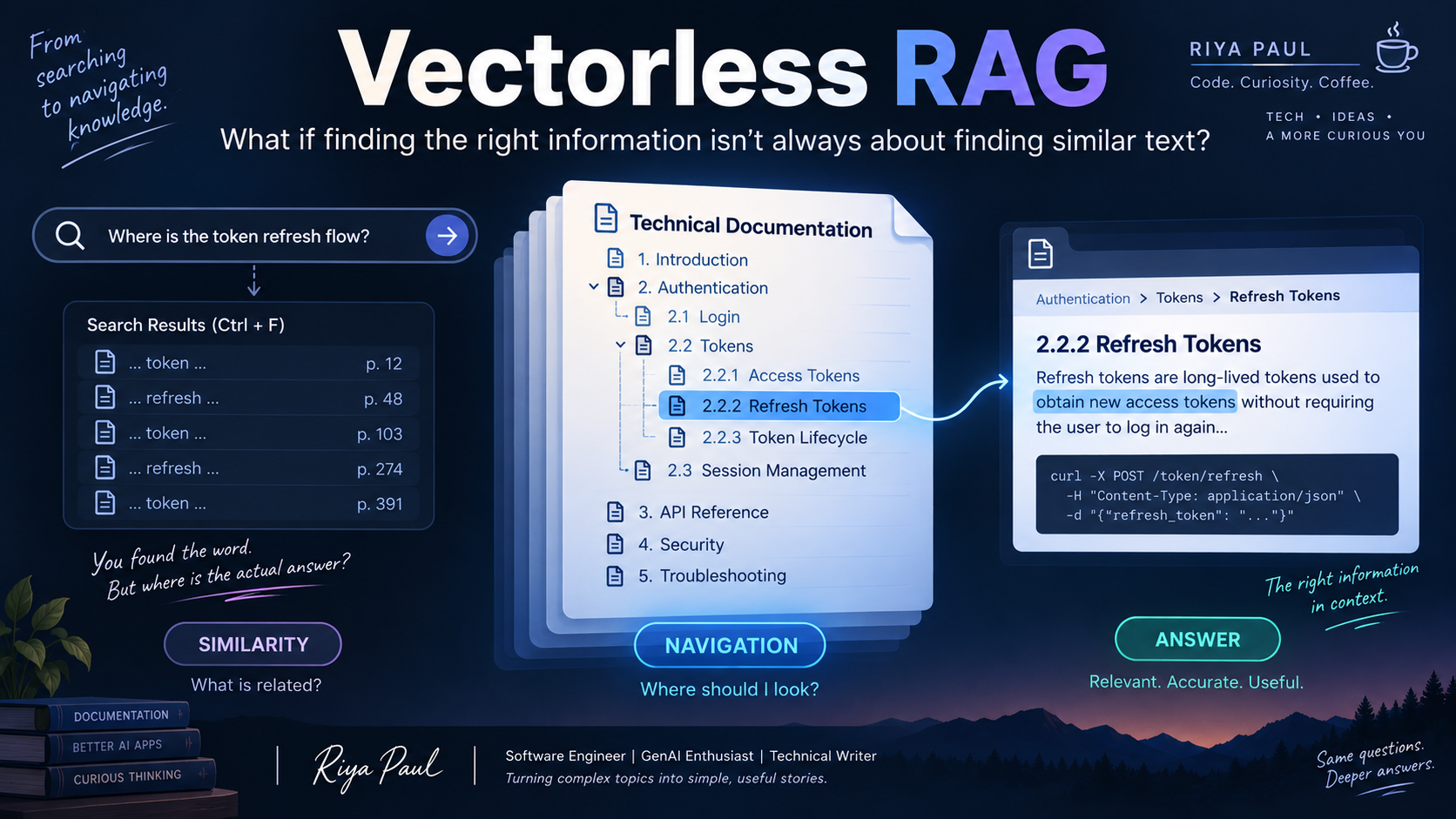
Have you ever opened a huge PDF, pressed Ctrl + F, typed exactly what you were looking for... and still ended up thinking:
“Okay. But where is the actual answer?”
That has happened to me more than once.
The annoying part is that the information is usually there. The document isn't missing anything. You found the word. Maybe you even found it 17 times.
You still don't know which result matters.
That little problem is actually a useful way to think about RAG.
We usually say the problem is:
“The LLM doesn't know this information, so let's give it access to the right documents.”
Fair enough.
But giving the LLM the documents is only half the job.
The other half is much less glamorous:
finding the right information inside them.
And this is where RAG usually starts with something very clever: vector search.
Take a document. Break it into chunks. Convert those chunks into embeddings. Store them in a vector database. When a question comes in, find the chunks whose meaning is closest to the question.
And honestly, it feels almost magical.
Ask:
“How can I reset my password?”
And the system can find a piece of documentation that says:
“To regain access to your account, select ‘Forgot Password’...”
The words aren't exactly the same, but the meaning is similar.
So naturally, we start thinking:
If semantic similarity works this well, why would we need anything else?
Now try the same idea on a very different question.
Imagine I give an AI a 500-page technical document and ask:
“Where exactly does this document explain the token refresh flow?”
I don't necessarily want the five paragraphs that sound most similar to my question.
I want the AI to understand the document well enough to think:
· Authentication...
· Tokens..
· Token lifecycle...
· Refresh tokens...
In other words, I don't want it to just search the document.
I want it to navigate the document.
That is the point where I stopped thinking only about “search” and started thinking about “navigation”.
And that leads to a very different question:
What if retrieval didn't need a vector database at all?
“Welcome to Vectorless RAG.”
So, What Does “Vectorless” Actually Mean?
The name itself can be a little misleading.
Vectorless RAG doesn't mean retrieval disappears.
It doesn't mean we stop searching.
And it certainly doesn't mean we throw away everything we know about embeddings and vector databases.
It simply means that vector similarity is no longer the primary mechanism driving retrieval.
Instead of representing a document mainly as a collection of embedded chunks and asking:
“Which chunks are closest to my question?”
we can represent the document in a way that preserves its structure, hierarchy, and relationships — and let the system reason about where the relevant information is likely to be.
Think about the difference between these two approaches.
Traditional vector-based retrieval
Document → Chunks → Embeddings → Vector Database → Similar Chunks → LLM
The system is essentially saying:
“Show me the pieces of text that are most semantically similar to this question.”
Vectorless retrieval
Document → Structure → Navigation → Relevant Section → Content → LLM
Now the question becomes:
“Given what I'm being asked, where in this document should I look?”
And that is a very different retrieval problem.
There is still one practical gap.
If we're not using a vector database to tell us which chunk is relevant, what exactly are we giving the AI to navigate?
Okay, then we need to give the AI something it can actually navigate.
Instead of treating a large document as thousands of disconnected chunks, what if we could first build a map of the document?
A map that tells the AI:
what sections exist,
how those sections are related,
where they appear,
what each section is about,
and which sections contain deeper subsections.
Then, when a question arrives, the AI doesn't have to blindly search through everything.
It can reason its way through the map.
At this point, I had a very practical question:
What would that map actually look like?
If we're giving an AI a 500-page document, we can't just tell it, “Here is the document. Good luck.”
We need some way of representing the document's organization so that the AI can understand where different pieces of information live.
Think about what happens when we open a large document.
We don't see 500 pages of equally important text.
We see a title.
We see chapters.
We see sections.
We see subsections.
We see page numbers.
We build a mental picture of the document as we move through it.
What if we could build something similar for an AI?
That is where PageIndex becomes a useful example.
Instead of treating the document as thousands of independent chunks, PageIndex creates a hierarchical, tree-structured index that represents how the document is organized.
For our technical document, that might look something like:
Technical Documentation
│
├── Introduction
│
├── Authentication
│   ├── Access Tokens
│   ├── Token Lifecycle
│   │   ├── Token Expiration
│   │   └── Refresh Tokens
│   └── Authentication Errors
│
├── Authorization
│
└── API Security
Look at what just happened.
The AI isn't looking at the document as one giant wall of text anymore.
It has a way to understand its shape.
And once you have that structure, the question “Where should I look?” becomes something an LLM can reason about.
So if I ask:
“What happens when an access token expires, and how is it refreshed?”
the AI can first identify the likely path:
Authentication → Token Lifecycle → Token Expiration / Refresh Tokens
and then retrieve the actual content from those relevant sections or pages.
This is the part I find fascinating.
We didn't make the document smaller.
We didn't magically make the answer appear.
We gave the AI a way to find its way through the document.
And that is the core idea behind PageIndex's approach to vectorless, reasoning-based retrieval.
Of course, making the map isn't enough.
The useful part is what happens when a real question arrives.
Because creating a map is one thing. Using it to answer a real question is another.
Let's take our question again:
“What happens when an access token expires, and how is it refreshed?”
The AI doesn't need to treat all 500 pages as equally important.
It can look at the structure it has been given and reason about where the answer is most likely to live.
It might start here:
Authentication
Then move deeper:
Authentication → Token Lifecycle
And from there:
Token Lifecycle → Token Expiration / Refresh Tokens
Now the system has narrowed down the part of the document it needs to inspect.
It can retrieve the actual content from the relevant pages or sections, and that content can then be given to the LLM to generate the final answer.
So the overall idea looks something like this:
Question
↓
Understand what we're looking for
↓
Reason over the document structure
↓
Navigate to the relevant section
↓
Retrieve the actual content
↓
Generate the answer
And there is an important distinction here.
The tree isn't the answer.
The tree is the navigation layer.
The original document still contains the actual information that grounds the answer.
It's similar to using a map when you're travelling.
The map doesn't contain your destination.
It helps you find your way to it.
That is the shift: the system is not searching less. It is using a different clue to decide where to search.
Traditional vector retrieval asks:
“Which pieces of text are most similar to my question?”
A structure-aware approach can instead ask:
“Given the way this document is organized, where should I look for the answer?”
We're not removing retrieval.
We're changing how we approach retrieval.
There is one catch, though.
So far, we have quietly assumed that there is only one document.
What happens when the AI doesn't have one 500-page document?
What if it has hundreds or thousands of documents?
Product documentation.
Technical manuals.
Research papers.
Policies.
Reports.
FAQs.
Meeting notes.
Each document can have its own structure.
Now the problem becomes bigger.
We don't just need to figure out:
“Where is the answer inside this document?”
We also need to figure out:
“Which document should I look at in the first place?”
We're no longer navigating a document.
We're navigating a body of knowledge.
Once there are hundreds of documents, another problem appears.
What if we could create a structured knowledge layer across all those documents?
Something that doesn't just help the AI find individual pieces of information, but helps it understand how the information across those documents is organized and connected.
At this point I started thinking about something that has existed for years outside AI: Wikipedia.
What If the AI Built Its Own Wiki?
Think about what we just did with one document.
We gave the AI a structure that helped it understand where information lives.
But when we have hundreds or thousands of documents, the problem changes.
The information might be there, but it is scattered.
One document explains the product.
Another explains the API.
A third contains troubleshooting steps.
A fourth might explain why a particular design decision was made.
And sometimes, the answer we're looking for isn't sitting neatly inside any one document.
It's spread across several of them.
This is actually not that different from how we use Wikipedia.
When we want to understand a topic, we don't necessarily want to read every document ever written about it.
We want some kind of organized knowledge structure.
We start with a topic.
Then we discover related concepts.
We follow links.
We move from one concept to another.
And gradually, we build an understanding of the bigger picture.
So here's an interesting thought:
What if an LLM could create a similar knowledge structure from a collection of documents?
Instead of asking the AI to search thousands of documents from scratch every time a question arrives, we could first use an LLM to analyze those documents and build a structured Wiki-like knowledge layer.
For example, imagine a company has thousands of documents about its authentication system.
The raw documents might look like:
authentication-design.pdf
api-documentation.pdf
mobile-auth-guide.pdf
security-policy.pdf
incident-report-2025.pdf
authentication-faq.pdf
Individually, each document contains useful information.
But together, they contain something much more valuable:
knowledge about the authentication system.
An LLM could analyze the information across these sources and organize it into concepts such as:
Authentication
│
├── Login
│
├── Access Tokens
│   ├── Token Creation
│   ├── Token Expiration
│   └── Token Refresh
│
├── OAuth
│   ├── Authorization Flow
│   └── Scopes
│
├── Mobile Authentication
│
├── Security Policies
│
└── Troubleshooting
Now we're looking at something different from a document index.
We're creating a knowledge structure.
The documents are still the underlying sources.
But the Wiki-like layer gives the AI a higher-level understanding of what concepts exist and how they relate to each other.
With that layer in place, the question itself changes.
Instead of:
“Which document contains something similar to my question?”
we can ask:
“Which part of this knowledge structure should I explore?”
Suppose the user asks:
“Why does the mobile app sometimes ask users to authenticate again even though their refresh token hasn't expired?”
That's no longer obviously a single-document question.
The answer might require connecting:
Mobile Authentication
→ Access Tokens
→ Token Lifecycle
→ Security Policies
→ Troubleshooting
The Wiki-like structure can give the AI a way to follow those relationships before it goes back to the underlying documents to retrieve the evidence.
And this is where the idea becomes particularly interesting.
The Wiki isn't supposed to replace the original documents.
It acts more like a knowledge layer on top of them.
The original documents remain the source material.
The structured Wiki helps the AI understand:
what the important concepts are,
how those concepts relate,
where the supporting information came from,
and where it should look when a question arrives.
So we can think of the architecture like this:
Documents
↓
LLM analyzes and organizes the knowledge
↓
Wiki-like knowledge layer
↓
User question
↓
Navigate relevant concepts
↓
Retrieve supporting source content
↓
LLM generates the answer
And suddenly, our original idea of retrieval has evolved again.
With vector RAG, we often think:
“Find similar text.”
With structure-aware retrieval:
“Navigate to the relevant part of the document.”
And with a knowledge layer:
“Navigate the relationships between concepts, then go back to the sources for evidence.”
That's a much bigger idea than simply removing a vector database.
We're starting to think about how an AI should organize knowledge before it retrieves it.
But there is a bigger implication here.
Could this Wiki-like structure actually become a kind of memory layer for an AI system?
Could This Become a Memory Layer for AI?
When we hear the word memory, we usually think about something that remembers what happened before.
For example, if you tell a person:
“Our authentication system changed last month. Refresh tokens now expire differently for mobile users.”
and you ask them about it a week later, you expect them to remember that information.
But for an AI system, memory doesn't necessarily mean remembering every conversation or storing every sentence.
What it really needs is something more useful:
A way to retain knowledge, understand how that knowledge is organized, and retrieve the relevant part when it is needed.
And that's where our Wiki-like structure starts becoming interesting.
Imagine an AI assistant working inside a company.
A developer asks:
“Why are mobile users getting logged out even though their refresh token hasn't expired?”
The answer might not exist as one clean paragraph in one document.
Maybe the authentication design explains the token lifecycle.
The mobile documentation explains how the app handles expired sessions.
The security policy explains why sessions can be invalidated early.
And an incident report explains that a particular security rule was introduced after an earlier vulnerability.
A simple keyword search might find some of these documents.
A vector search might find semantically similar passages.
But the Wiki-like knowledge layer can provide something different:
It can tell the AI how these pieces of knowledge are related.
Instead of thinking only:
“Which text looks similar to this question?”
the system can start thinking:
“Which concepts are involved in this question, and what other concepts are connected to them?”
For our example, the reasoning path could look something like:
Mobile Authentication
↓
Session Management
↓
Refresh Tokens
↓
Token Lifecycle
↓
Security Policies
↓
Session Invalidation
The Wiki doesn't necessarily contain the final answer.
It acts more like a map of the knowledge.
Once the AI knows which concepts matter, it can go back to the original documents and retrieve the actual evidence.
That's an important distinction.
The Wiki Is Not the Memory Itself
It would be easy to think:
“So we just put everything into this Wiki and now the AI has memory.”
Not quite.
The Wiki-like structure is better thought of as a memory layer rather than the complete memory itself.
The original documents are still important.
They contain the actual source material, details, policies, examples, dates, decisions, and explanations.
The knowledge layer helps the AI understand how those pieces fit together.
So instead of:
Documents
↓
Search
↓
Answer
we start moving toward:
Documents
↓
Knowledge Structure
↓
Understand Relationships
↓
Navigate to Relevant Concepts
↓
Retrieve Source Evidence
↓
Generate Answer
And that changes how I think about retrieval.
The AI is no longer treating a document collection as a giant pile of text.
It starts treating it more like a connected body of knowledge.
Why Is That Useful?
Think about how humans usually navigate a large technical system.
Suppose you're new to a company's payment platform.
You don't open 500 documents and read every paragraph hoping to find something useful.
You first build a mental model:
Payments → Orders → Payment Gateway → Transactions → Refunds → Failed Payments
Once you understand that structure, finding information becomes much easier.
You know where to look.
You also know which concepts are related.
And when one document doesn't answer your question completely, you naturally move to another related concept.
A knowledge layer can give an AI something similar.
Not human intuition, of course.
But a structured representation of the relationships between concepts.
That can be especially useful when the information is hierarchical or highly interconnected.
But there is another thing worth thinking about.
Knowledge Can Evolve
Imagine that six months later, the company changes its authentication system.
The refresh-token policy changes.
A new mobile authentication flow is introduced.
A security rule is updated.
The underlying documents change.
A useful knowledge layer should be able to evolve with them.
That means the Wiki cannot simply be treated as a static page generated once and forgotten.
It needs to be maintained.
New information may introduce new concepts.
Old relationships may become invalid.
Some documents may become outdated.
And sometimes two documents may even contradict each other.
So now we discover another important part of the problem:
Building the knowledge structure is only half the challenge. Keeping it trustworthy is another.
This is where the idea of an AI memory layer becomes much more interesting—and much harder.
Because memory isn't useful just because something was stored.
It is useful when the system can answer:
What do I know?
Where did I learn it from?
How is it related to what I already know?
And is that information still valid?
That brings us to one of the biggest questions around Vectorless RAG:
If we can navigate knowledge using structure and reasoning, do we even need vector retrieval anymore?
So... Do We Still Need Vector Retrieval?
Honestly?
Yes.
And this is probably the most important thing to understand about Vectorless RAG.
The moment we discover a new approach, it's tempting to think the old approach must have been wrong.
Vector databases were everywhere.
Now we're talking about removing them.
So it would be easy to conclude:
“Vector RAG is outdated. Vectorless RAG is the replacement.”
But that's not really what is happening.
Because remember what vector search was actually good at.
Suppose I have thousands of customer reviews:
“The app keeps freezing whenever I try to upload a large video.”
And someone asks:
“Why does the application become unresponsive during large file uploads?”
There may be no neat hierarchy connecting those two sentences.
There may not even be a meaningful section called Large File Upload → Application Freeze.
The useful signal is simply that the two pieces of text are talking about a similar problem.
That's exactly where semantic similarity shines.
The vector representation can help us discover that relationship even when the wording is completely different.
And that's something structure alone may not solve particularly well.
Different Questions Need Different Retrieval Signals
Think about the two questions we've been asking throughout this article.
First:
“Which piece of text talks about something similar to my question?”
That's a semantic retrieval problem.
Vector search is naturally good at this.
Now consider:
“Where in this 500-page document is the token refresh flow explained?”
That's more of a navigation problem.
If the document has a meaningful hierarchy, understanding that structure can be much more useful than comparing thousands of chunks by similarity.
So the difference isn't really:
Vector = bad
and
Vectorless = good.
It's more like:
Similarity and structure are different signals.
And depending on the data and the question, one signal may be much more useful than the other.
Let's Put Them Side by Side
At a high level, the retrieval process looks like this:
Vector RAG | Vectorless RAG | |
Primary signal | Semantic similarity | Structure + reasoning |
Representation | Embedded chunks | Hierarchical index |
Retrieval question | “What text is most similar?” | “Where should I look?” |
Best suited for | Scattered, unstructured information | Structured, hierarchical documents |
Typical strength | Fast semantic matching | Navigating long, structured documents |
Main dependency | Embeddings + vector retrieval | Quality of structure + LLM reasoning |
Main challenge | Chunking and retrieval quality | Reasoning cost + navigation accuracy |
But this table hides something important.
The choice isn't actually between two technologies.
It's a choice about what kind of information you're trying to retrieve.
And that changes everything.
When Vector RAG Makes More Sense
Imagine a knowledge base containing:
customer conversations
support tickets
product reviews
FAQs
random internal notes
troubleshooting messages
There may be no reliable hierarchy.
One support ticket might mention a problem that another document explains completely differently.
A rigid tree structure may not naturally represent this information.
But semantic embeddings can still connect related ideas.
For example:
“My payment went through but the order still says pending.”
could retrieve:
“Orders may remain in a pending state if the payment webhook hasn't been processed.”
The vocabulary is different.
The underlying meaning is similar.
That's where vector retrieval is powerful.
It doesn't need the documents to already have a perfect structure.
It can discover semantic relationships from the content itself.
When Vectorless RAG Becomes Interesting
Now switch to a completely different dataset.
Imagine:
a 900-page financial filing
a 700-page regulatory document
a technical specification
a legal contract
a large API manual
an academic textbook
These documents already have structure.
They have chapters.
Sections.
Subsections.
Appendices.
Tables.
References.
Page boundaries.
And often, the meaning of a piece of information depends heavily on where it appears in the document.
If I ask:
“What are the conditions under which this policy applies?”
I may not simply want the paragraph that has the most semantically similar words.
I want the section where the policy defines its scope, followed by the relevant exceptions and conditions.
That's a navigation problem.
And this is where Vectorless RAG starts to make a lot of sense.
But Vectorless RAG Has Its Own Problems
Of course, once we say that structure and reasoning can replace vector retrieval, another question appears:
What happens when the structure isn't good?
A tree is only useful if it represents the document correctly.
If the indexing process misunderstands the document hierarchy, the AI may navigate to the wrong place.
And unlike a simple similarity lookup, reasoning through a structure can require additional LLM calls.
That can introduce:
higher latency
higher inference cost
more complex retrieval logic
dependence on LLM reasoning quality
There is also another practical issue.
Not every document has a beautiful structure.
A well-written regulatory filing may have an excellent hierarchy.
But what about 20,000 support tickets?
Or thousands of short emails?
Or a folder full of loosely formatted notes?
Trying to force everything into a meaningful tree may actually make the system harder to build.
So Vectorless RAG isn't a universal replacement either.
And that's when another possibility starts to make sense.
What if we didn't have to choose?
What If We Didn't Have to Choose?
This is where things get more practical.
Because in a real AI system, we don't necessarily have to pick one retrieval strategy and use it for everything.
We can use different retrieval signals for different parts of the problem.
For example, imagine our knowledge base contains both:
a 900-page regulatory document
thousands of customer support tickets
API documentation
product FAQs
internal engineering notes
Why should every one of these sources be retrieved in exactly the same way?
They don't have the same structure.
They don't contain the same kind of information.
And users don't ask the same kind of questions about them.
So instead of asking:
“Should we use vector RAG or Vectorless RAG?”
we can ask a better question:
“Which retrieval strategy is most useful for this particular query and source?”
And this is where hybrid retrieval becomes interesting.
Combining Similarity With Structure
Imagine a user asks:
“Why is the payment showing as pending even though the transaction was successful?”
The system could first use vector search to find documents and passages related to:
payment → pending → successful transaction
That's useful because the relevant information might be scattered across support tickets, FAQs, and engineering notes.
But suppose one of the retrieved documents is a 500-page payment architecture document.
Now structure can take over.
Instead of searching every chunk inside that document, the system can navigate:
Payment System
↓
Transaction Processing
↓
Transaction States
↓
Pending State
↓
Failure / Recovery Handling
The two approaches are no longer competing.
They're working together.
Vector retrieval helps answer:
“Which sources are probably relevant?”
Structure-aware retrieval helps answer:
“Where inside those sources should I look?”
And an LLM can then reason over the retrieved evidence and generate the final answer.
So a hybrid pipeline might look like:
User Question
↓
Query Understanding
↓
Semantic / Vector Retrieval
↓
Relevant Documents
↓
Structural Navigation
↓
Relevant Sections / Pages
↓
Source Evidence
↓
LLM
↓
Answer
This gives us something quite powerful.
We're no longer forcing the entire knowledge base into one retrieval mechanism.
We're allowing the retrieval system to use the right signal at the right stage.
It Can Go Even Further
The interesting thing is that hybrid doesn't necessarily mean:
Vector first → Structure second
every single time.
The order can depend on the system.
For one knowledge base, we might first identify the relevant documents using metadata or document descriptions and then navigate their internal structure.
For another, semantic retrieval might be the fastest way to narrow down thousands of possible sources.
For a highly structured collection, the system might begin with document structure and use semantic retrieval only when it reaches ambiguous areas.
In other words:
Hybrid retrieval is less about one fixed architecture and more about combining complementary retrieval strategies.
That brings us to a much more useful question.
So, How Do We Choose?
There isn't a universal answer.
The first thing to look at is the shape of your data.
If your information is mostly:
unstructured
short-form
scattered across many sources
semantically related but not hierarchically organized
then vector retrieval can be a very strong choice.
If your information is mostly:
long-form
hierarchical
section-heavy
highly structured
dependent on document context
then structure-aware or Vectorless retrieval becomes much more attractive.
And if your system contains both kinds of information, hybrid retrieval may be the most natural solution.
But there is one more thing to consider.
The shape of the question matters too.
A question like:
“Find discussions where users complain about slow uploads.”
is primarily a semantic discovery problem.
But:
“Which section of the API specification defines the timeout behavior for upload requests?”
is much more of a navigation problem.
And then there are questions like:
“Why are users experiencing upload timeouts, and what does the API specification say about the configured timeout?”
Now we may need both.
We might discover the problem through semantic retrieval, navigate the technical documentation structurally, and then combine evidence from both.
So perhaps the better mental model is not:
             Retrieval
                 │
       ┌─────────┴─────────┐
       │                   │
   Similarity           Structure
       │                   │
"What is related?"     "Where is it?"
       │                   │
       └─────────┬─────────┘
                 │
             Reasoning
                 │
               Answer
And suddenly, the title of this article starts to feel a little different.
“Can we build RAG without a vector database?”
Yes.
But that doesn't necessarily mean we should.
The more interesting question is:
“Do we actually need vector retrieval for this particular problem?”
Sometimes the answer is yes.
Sometimes structure is a better signal.
And sometimes the best system is one that knows when to use both.
What Vectorless RAG Really Changes
When I started looking at Vectorless RAG, the obvious question was:
“How can we do RAG without vectors?”
But I think that's actually the smaller question.
The bigger question is:
“How should an AI find information when the information itself has structure?”
Vector databases gave us a powerful way to search by meaning.
That's incredibly useful.
But meaning isn't the only signal available to us.
Documents also have:
hierarchy
sections
page boundaries
relationships
references
concepts
metadata
context
And sometimes, those signals tell us much more about where the answer lives than semantic similarity does.
That's what makes Vectorless RAG interesting.
It isn't simply about removing a database.
It is about changing the mental model of retrieval.
From:
“Find the most similar text.”
to:
“Understand the information, navigate it, and retrieve the evidence that actually answers the question.”
And once we start thinking that way, the idea naturally expands beyond a single document.
We can build document indexes.
We can build knowledge structures.
We can connect concepts across documents.
We can create Wiki-like layers.
We can use those layers as a form of organized memory.
And we can combine structural reasoning with semantic retrieval when that makes sense.
So maybe the future of RAG isn't about choosing vector or vectorless.
Maybe it's about building retrieval systems that understand that information comes in different shapes — and retrieval should adapt accordingly.
